



New to PeriCoach? Let’s Get You Started
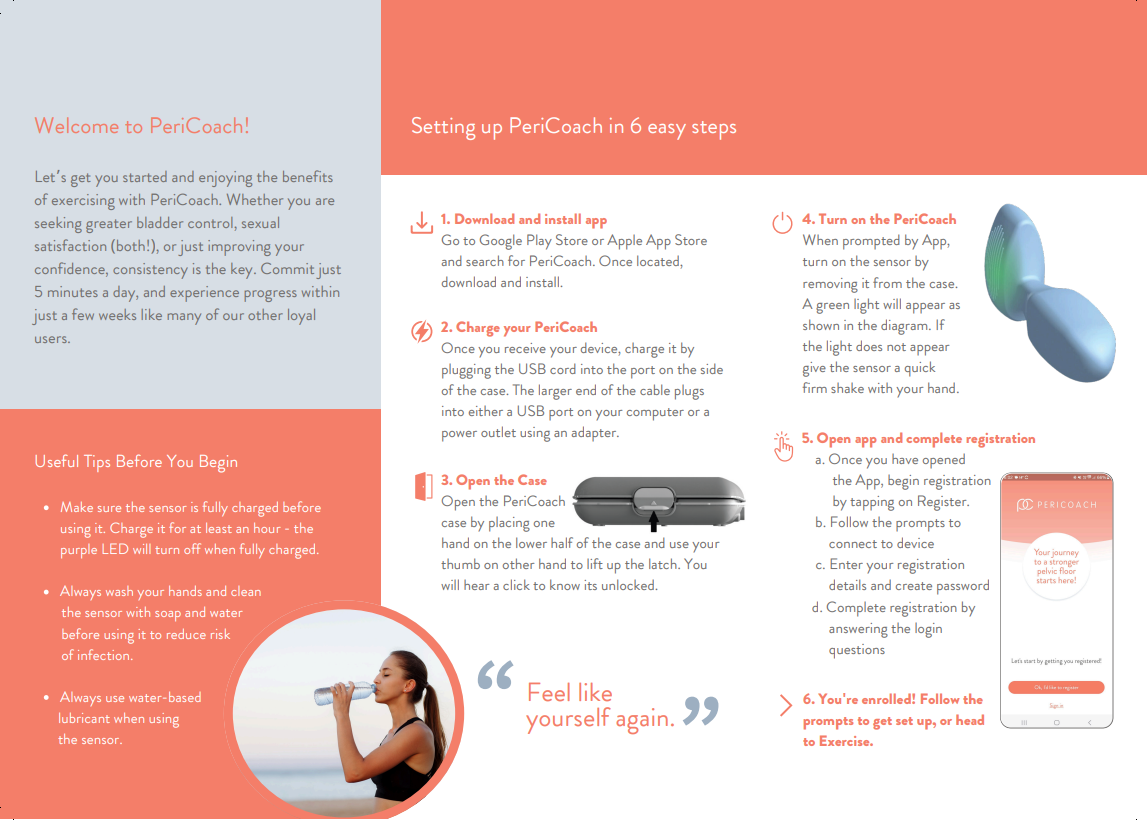
Your PeriCoach comes with a QuickStart Guide. This is fastest way to get started with PeriCoach. Setting up Your PeriCoach takes place in 6 easy steps:
- Download and install app
- Charge your PeriCoach
- Open the case
- Turn on the PeriCoach
- Open the app and complete your registration
- Head to Exercise to get started!
Don't have a Quick Start Guide? Get one from us here.
SETTING UP VIDEO
For additional guidance, watch our step-by-step instructional video to get an in-depth look at how to use the PeriCoach System efficiently and effectively.
PERICOACH FAQs
Below is a helpful list of frequently asked questions about Pericoach.
The tick/cross/question mark that appears after each rep for Version 3 users indicates how good your technique was for that rep. Good squeeze technique is vital to improving muscle strength so if you continue to receive crosses you may want to consult a clinician for advice.
 = good technique
 = suggests improvement needed
 = technique performance could not be determined (focus on better technique)
The battery will deliver approximately four hours of continuous use and approximately one week in standby mode. By storing the probe in the charging case, you will extend the battery life.
The PeriCoach comes with a discreet case that can store the sensor, as well as charge it between uses. Ensure the sensor is cleaned and dried before storing in the charging case. Ensure the sensor is cleaned with soap and water and dried after use before storing in the charging case. We recommend to fully close lid to prevent lint/dust build up on the sensor unit.
This message means the Bluetooth connection between the sensor and your smartphone has been interrupted. There is no need to remove the sensor. Simply press the Battery Icon Indicator located in the top right corner of any page and the app will attempt to reconnect with the sensor. You may need to follow the in-app prompts before connection is re-established. Ensure the phone is within direct range of the inserted sensor. This may require opening legs so that inner thigh is not covering the handle of the sensor.
To clean the probe:
1. In a clean bowl or washbasin dilute a mild household soap/detergent with water.
2. Soak a soft cloth in the soapy water and wring out the excess moisture.
3. Wipe the probe all over.
4. Rinse the cloth in water until it is free of all detergent.
5. Wring out the excess moisture and wipe the probe all over.
6. Let the probe dry before replacing it in the charging case.
The PeriCoach is designed to assist in performing proper pelvic floor exercises, known to improve muscle strength and endurance leading to reduction or elimination of bladder leaks as well as improve sexual satisfaction. Just as with all forms of exercise, consistency is key and progress may occur at different rates based on your starting circumstances. Women exercising an average of 5 sessions a week report improvements as early as 4 weeks. However, if you have an underlying condition or your incontinence is not due to a weak pelvic floor, you may need to seek alternative treatment.
The PeriCoach is safe to use during a normal pregnancy as it does not deliver any energy into the body. If you have an unstable pregnancy, or if your doctor has advised you against sexual activity during your pregnancy you should not use the PeriCoach whilst pregnant.
No. The PeriCoach is a single-user product. Multiple patient use will corrupt your recorded exercise history, invalidate your product warranty, and render you ineligible for treatment guarantees and reimbursement.
Yes. You choose not to select a clinician in the registration process, and only you will be able to see your results. If you have already selected a clinician and would like to cancel this, you may “De-authorise” that clinician at any time by visiting the “Clinician Details” tab in your Patient Portal.
You may share your data a couple of ways: print performance history from your User Portal or connect directly with your clinician through your Portal.
- To print performance history, select "Print Page" at the top right corner of the Exercise History, PeriTrack Results or each session details.
- To share your exercise data with a preferred clinician, they must first be registered as a PeriCoach Provider, which they can do via https://my.pericoach.com/register/newclinician. Once this is completed you may search and select to Authorise next to their name under the Clinician Details section of your User Portal. Your clinician will then need to accept your connection request in their Clinician Portal.
Ensure your phone is able to connect to the internet by checking your mobile data or WiFi setting on the phone. It needs to be switched to “on”. Ensure you are logged into the app. If still no connection you may need to check your mobile plan with your internet provider. My mobile phone won’t connect to my sensor.
Refer to “Setting up PeriCoach” in the Instructions for Use for how to connect the phone and sensor. If you are unable to see the PeriCoach in the connections screen, please wait a few minutes. If you still do not see it, back out to the home screen and initiate connection again. Another way to connect once paired is to turn the sensor on and then open the app -
the probe should auto connect after pressing the Battery Icon Indicator.
Your username will be the email used during the purchase of PeriCoach. Ensure that you have finalised your registration as the final step in the purchase process, where you selected a password. If you missed this step you can complete registration via the email link that will have been sent to you following purchase. If you did complete registration and still cannot remember the password visit the portal login page, https://my.pericoach.com/Account/Login, and underneath the login username and password fields is a Forgot Password link. Click on this and then enter your Username, the same email you signed up with at purchase. If you are having any problems with this please contact our help team at help@pericoach.com.
Login to your portal located at pericoach.com/user and select Account Details tab. Select Change Password and enter new password accordingly, press Save.
Yes. Holding your breath can cause abdominal muscles to contract and increase intra-vaginal pressure which may result in skewing your pelvic floor muscle performance. Consciously inhale, exhale then breathe normally as you press start on an exercise session, and squeeze and lift your pelvic floor muscles as guided by the programmed sessions.
Have a different question?
We’re here to support you. Reach out to our team anytime using the 'Contact Us' option below.
MORE INFORMATION
Click on any of the resources below to download the PDF


Looking for a different resource?
We’re here to support you. Reach out to our team anytime using the 'Contact Us' option below.